
How to Keep Your Data Safe in an AI Deepfake World
A few years ago, faking a video of someone needed a film studio. Today it takes a few photos, a short voice clip and an app. That is why deepfakes have moved from celebrity news into ordinary lives. People now get fake profiles, edited images and cloned-voice phone calls using their face or name.
The good news is that you can reduce your risk a lot with simple habits. This guide covers what deepfakes are, how they hurt people, how to protect yourself, and what to do if it already happened.
What is a deepfake, and why is your data the target?
A deepfake is an image, video or audio clip made or changed by AI to look like a real person. The AI learns from material that already exists: your photos, videos and voice notes.
That is why your data matters. The more clear photos and voice recordings of you are public, the easier you are to copy.
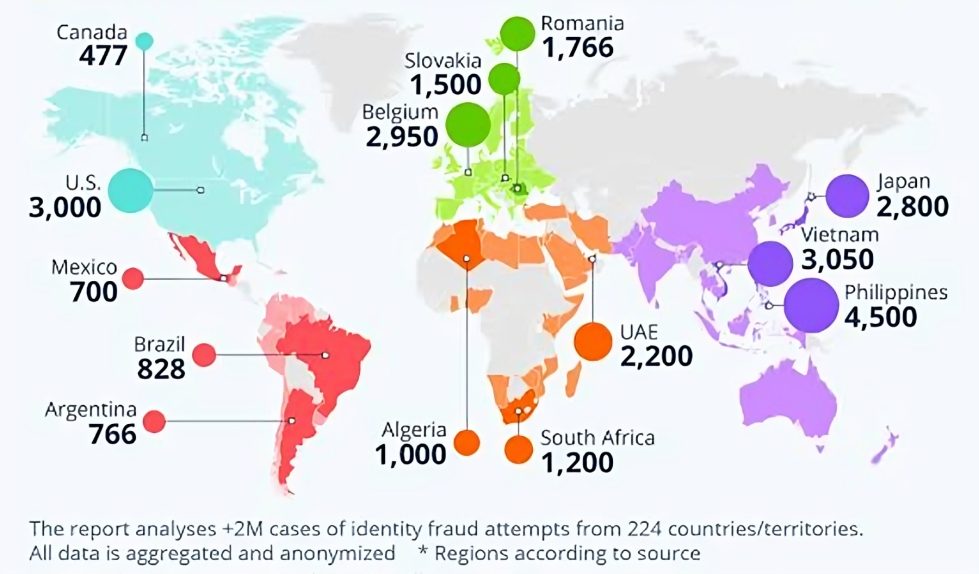
How deepfakes are used against ordinary people
- Fake profiles. Someone copies your photos and name on Instagram, Facebook or WhatsApp and messages your friends, family or customers.
- Voice-clone scams. A caller sounds like your relative or boss and asks for urgent money.
- Fake endorsements. A fake video of a business owner or executive promotes a scam.
- Intimate image abuse. Faces are placed on explicit images to shame, blackmail or harass. This is a crime in many places, and you are never at fault.
- Reputation attacks. Fabricated clips or screenshots used to damage a person or a brand.
10 ways to protect your data
1. Share fewer high-quality face photos in public. Clear, front-facing photos are the easiest to copy. Keep full-resolution photos and videos for friends only.
2. Lock your privacy settings. Make your accounts private where you can. Limit who can see your photos, tag you and message you.
3. Think before posting your voice. Long, clear voice clips can be cloned. This matters most for people who run public channels, so be careful about what you leave publicly available.
4. Turn on two-factor authentication. If your real account is taken over, the fake version is even harder to spot. Use an authenticator app instead of SMS where possible.
5. Agree a family safe word. If someone calls in a panic asking for money, ask for the word. A scammer with a cloned voice will not know it.
6. Verify through a second channel. If a message, voice note or video asks for money or sensitive data, hang up and call back on a number you already have.
7. Learn the warning signs. Look for odd blinking, blurred edges around the face or hair, lighting that does not match, lip movement that is slightly off, and pressure to act immediately. These signs are getting harder to see, so context matters more than pixels.
8. Search for yourself regularly. Run a reverse image search on your profile photo and search your name every month or two. Set a Google Alert for your name or business.
9. Protect your business. Use a call-back rule for payments and bank changes, and make sure staff know that a video call or voice message alone is not proof of identity.
10. Keep records of what you post and where. If someone copies your content, original files with dates help prove which version is real.
If it already happened: what to do first
- Do not engage with the person. Replying can make things worse.
- Save evidence before reporting. Take screenshots showing the full page, the profile link (URL), the date and the account name. Reports often remove the page, and then proof is gone.
- Report on the platform. Use the impersonation, fake account or non-consensual image option on Instagram, Facebook, WhatsApp, TikTok, X, YouTube and others.
- Warn your contacts. Tell friends and customers that the account is fake, without linking to it.
- Use the dedicated tools for intimate images. StopNCII.org helps prevent known intimate images from being shared on participating platforms. For images of anyone under 18, the NCMEC Take It Down tool can help.
- Ask Google to remove results. Google has request forms for removing certain harmful content, including non-consensual explicit imagery, from search results.
- Report serious cases to the police. In India you can file a complaint at cybercrime.gov.in or call 1930 if money was lost. Other countries have similar cybercrime reporting sites.
When you need more than a report button
Platforms often reject the first report, especially for deepfakes, or the content comes back under a new account. Fake content also spreads across many sites and search results at once. This is where removal gets time-consuming.
That is the work our team does at Super Web Development. We find the fake profiles, images and videos, collect time-stamped evidence, and file removal requests with the platforms, hosts and search engines. You can see what we cover on our AI Deepfake Image Remover page, check our fixed prices on the pricing page, or message us directly on WhatsApp. No platform or provider can guarantee removal, but a well-documented report improves your chances a lot.
Quick checklist
- Accounts set to private, with two-factor authentication on
- Family safe word agreed
- Call-back rule for money requests
- Reverse image search done on your main photos
- Evidence saved the moment anything looks wrong
FAQ
Can I stop deepfakes completely?
No. But limiting public photos and voice, and acting fast when something appears, makes you a harder target and shortens the damage.
Can deepfakes be detected reliably?
Not by eye alone, and detection tools are not perfect either. Treat anything unexpected that asks for money or private data as suspicious until you verify it another way.
Is making a deepfake of someone illegal?
Laws differ by country, but creating or sharing deceptive or intimate fake content without consent is increasingly illegal. For advice on your situation, speak to a local lawyer.
What should I do first if I find a fake profile of me?
Save screenshots and the link, report it on the platform, and tell your contacts. Then ask for help if it is not removed within a few days.

Super Web Development LLP (WDG) is a full-service digital agency specialising in SEO, web development, AI automation, and enterprise solutions. Our free SEO tools are used by thousands of businesses worldwide to improve their organic search visibility.